Galaxy S5 new in january 2014

www.apk-soft.net/2014/01/galaxy-s5.html

There have been more than enough rumors around the Galaxy S5 already, and perhaps an equal number of reports have also surfaced dispelling all those rumors (not to mention dampening our hopes), but what kind of rumor mill would it be if it stopped already. Despite the claims that Samsung will play it safe with the upcoming and highlight-anticipated Galaxy S5, a new report from iNews24 makes it seem that the Korean manufacturer might actually be looking to toss in a few fresh ideas for its latest flagship Android smartphone when it gets launched in March (reportedly).

The claim from iNews24 comes attributed to Samsung’s Vice President and Head of Design Strategy Dong-hoon Chang, who let people in on some of the secrets pertaining to the elusive new device at a New Year’s party in Seoul, Korea.

According to the latest rumor, Samsung might let go of the infamous plastic body in favor of a more robust and good looking metal and flexible plastic combo. Chang also claimed that the official announcement of Galaxy S5 might come at Mobile World Congress 2014 in Barcelona next month, which would make sense, seeing as how MWC is considered one of the most important events in the world of mobile technology. That would also make sense from the perspective of device’s actual availability, which has all been but confirmed for March this year.

There is, of course, an absolute possibility that Chang’s references did not really pertain to Galaxy S5, but rather, an entirely different device, say, the Galaxy F (which itself is nothing more than a rumor as of now). Either way, whether it’s the Galaxy S5 that was being discussed or something else, the news of new materials is definitely exciting.

www.apk-soft.net/2014/01/galaxy-s5.html
As of now, there are a lot of rumors surrounding the next Android flagship from the Korean manufacturer, and if we were to club them all together, Galaxy S5 is going to be one hell of a device. Rumors will continue to pile up for sure, and it is a fact that we won’t know anything for sure until an official announcement comes out. However, that doesn’t mean that these rumors won’t keep us charged.
source

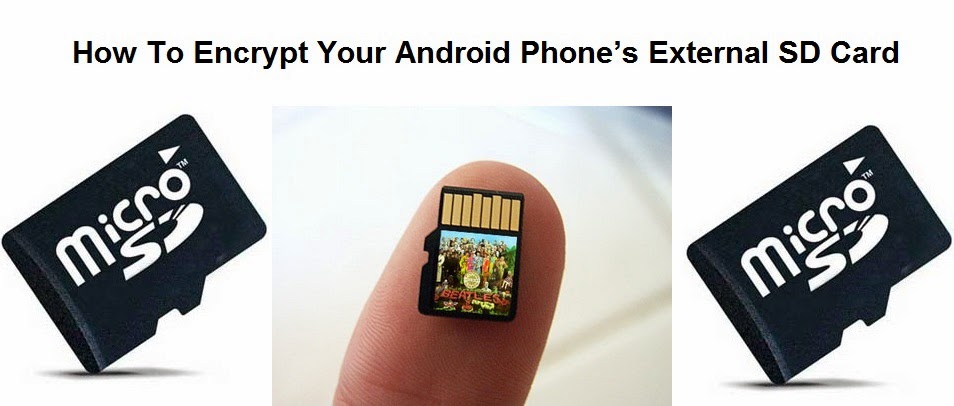
How To Encrypt Your Android Phone’s External SD Card

www.apk-soft.net/2014/01/Encrypt-Your-SD-Card.html

Most of us have important paperwork’s and other private data that we need to keep private. As we keep transitioning from Desktops to Smartphones, our private data are now more vulnerable than before. The reason being Smartphones are portable and it makes them easy target for thieves.
We don’t want that to happen with your devices, and neither we are the ones who can control it. Also many a times we are responsible for losing our smartphones due to our irresponsibleness.

So you must be always be prepared beforehand. Nobody knows when or how your smartphones can be lost or stolen, but with Android you do have the ability to encrypt your phone’s External SD Card. Which will render your phones SD card useless once your phone is lost.This is what usually happens when your phone gets lost or stolen.

Usually we have our phone secured with a lock pattern or code. In case somebody finds your lost android phone, they might not be able to access your cell phone’s content because of the security lock, but they can take out your external SD card and access its content on a PC. This is a main reason why you need to encrypt your Phone’s external SD card if you have important or private data on it.

Once your phone’s External SD card is encrypted, it will then be highly impossible for anyone to read its content on any other device except your Android phone. To be frank you can even encrypt your whole Android phone, but the reason why i won’t advise for that is, Encrypting your android phone will make it slower. Here is how you can encrypt your Android phone’s External SD Card.
How To Encrypt your Android Phone’s External SD Card

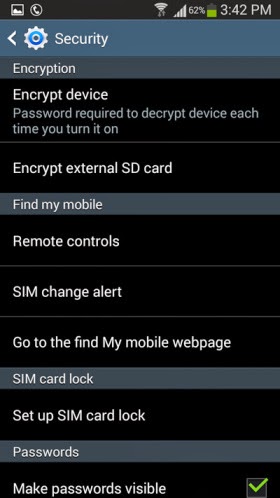
    Step 1: Open the Settings on your Android phone and navigate to the Security section. ( This might differ on different handsets )
    Step 2: Tap on Encrypt external SD card to start the process for encrypting your phone’s SD card.

www.apk-soft.net/2014/01/Encrypt-Your-SD-Card.html


Note: It is compulsory to select a password as the screen lock method if you want to enable encryption for the SD card. Unless you set the screen lock as a password, your phone will not allow you to encrypt the external SD card.

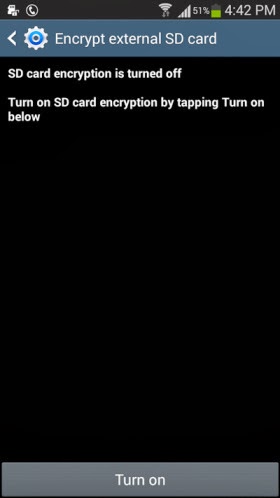
    Step 3: Once you have set a 6 digit password as the screen lock, you can then see the following option appear. Tap on Turn on card to encrypt your phone’s external SD card

www.apk-soft.net/2014/01/Encrypt-Your-SD-Card.html

    Step 4: Tap on Yes on the next screen to encrypt all files on your phone’s external SD card.

www.apk-soft.net/2014/01/Encrypt-Your-SD-Card.html

    Step 5: Next you will be prompted whether you want to encrypt all multimedia files. Tap on Yes or No according to your requirement. in case there are any multimedia files that needs to be encrypted on your phone’s SD card the tap on Yes.

www.apk-soft.net/2014/01/Encrypt-Your-SD-Card.html

www.apk-soft.net/2014/01/Encrypt-Your-SD-Card.html

    Step 6:
Next tap on Continue and enter the password when prompted.

www.apk-soft.net/2014/01/Encrypt-Your-SD-Card.html

www.apk-soft.net/2014/01/Encrypt-Your-SD-Card.html

    Step 7: Finally you will need to tap on Apply to start the encryption process. Remember according to the SD card’s size, it might take a while for the encryption process to be completed. I tested this feature on a 4GB SD card which took around 20 minutes to encrypt.

www.apk-soft.net/2014/01/Encrypt-Your-SD-Card.html

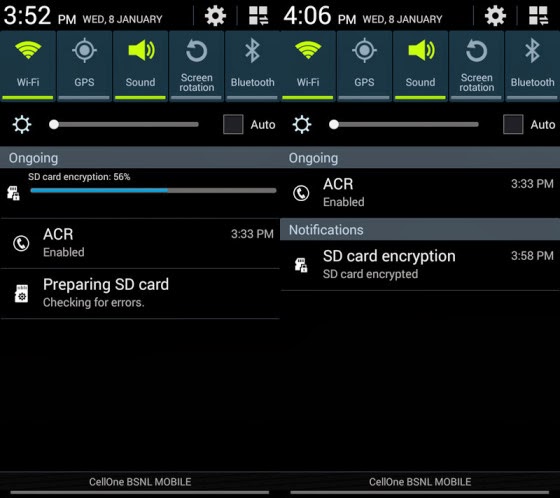
You can expand the notification bar to see the progress of the encryption process. Once the SD card is encrypted you will see the following notification.

www.apk-soft.net/2014/01/Encrypt-Your-SD-Card.html 

That’s it and now the content on your SD card are completely protected. For any reasons if you want to decrypt the contents of the SD card then you can navigate to the Encryption settings on your android phone and tap on Turn off to decrypt the external SD card.

English Tenses For Android


All you need to know about English Tenses is here.
The simplest presentation of English Tenses, learn it once and remember it for life time.
Tenses in any language are the basic and one of the most important topics in both writing and communication of that language.
This app helps you to learn the Tenses of English languages in a very easy and effective way. All the topics in this app are covered in depth and in a most simple way.
Our app covers
Simple Past Tense
Past Continuous Tense
Past Perfect Tense
Past Perfect Continuous Tense
Simple Present Tense
Present Continuous Tense
Present Perfect Tense
Present Perfect Continuous Tense
Simple Future Tense
Future Continuous Tense
Future Perfect Tense
Future Perfect Continuous Tense
more:
Tenses and Active and Passive Voices
A better user interface with different sections for Practice and Study.

Size : 1.5M
Current Version : 3.4
Requires Android : 2.1 and up
source

Samsung Smart Home platform to debut at CES 2014

Samsung Smart Home platform to debut at CES 2014

Getting in some early news, Samsung has – as part of CES 2014 – The Samsung Smart Home platform will enable users to manage all of their connected appliances and devices through a single application., a means by which users will be able to control all their connected home appliances (from refrigerators to air conditioners to smart light bulbs) through a single app on their compatible smartphone, tablet, smart TV, or wearable device.

According to Samsung, the company is also extending the Samsung Smart Home platform to third-party manufacturers in order to make the platform more widely usable by consumers.

When travelling abroad or even just when you’re not at home, you can use your smartphone or tablet to monitor your smart devices and controlling their functions, such as turning on the lights remotely.

Samsung will also introduce voice commands that can be used to control several appliances at once. For example, you could say ‘going out’ to your Samsung Galaxy Gear for your TV, lights and other select appliances to be switched off. Or you could say ‘good night’ to your TV remote for the TV to switch off and your lights to slowly dim until they are completely off.

www.apk-soft.net/2014/01/Samsung-Smart-Home-2014.html

To start, the service will cover three main areas, which Samsung identifies as :

      Device Control.
    Home View.
    Smart Customer Service.


Device Control, as you might guess, allows users to control home devices using a mobile device remotely. The feature also allows for voice commands so if, for example, you’re going to bed, you could tell your smart TV “good night,” and it would know to turn off and tell the lights to dim gradually.

Home View will give users a peek inside their own home with “in-built appliance cameras.”

Smart Customer Service will notify you “when it’s time to service appliances or replace consumables.”

What is perhaps more interesting than Samsung’s initial offering – which will roll out across Samsung’s own devices and appliances “in the first half of 2014″ – is that the manufacturer has developed a “Smart Home software protocol” that will allow other device and appliance manufacturers to gain compatibility with the system.

Samsung also notes in its release that it plans to expand the service to home-energy, secure home access, healthcare, and “eco home applications” through unspecified third-party partners. For the full announcement, hit the link below.

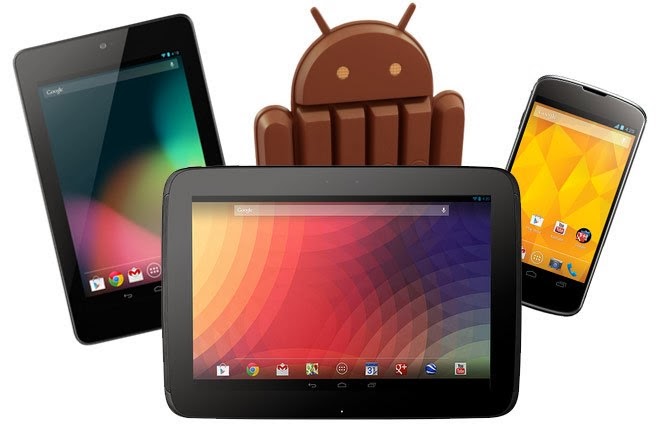
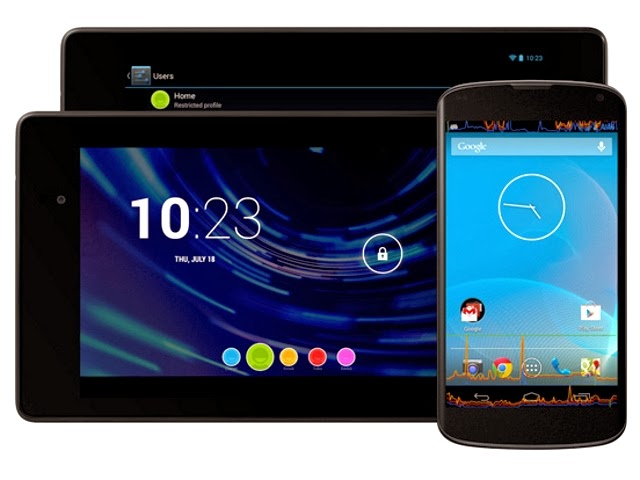
Install Official Android 4.4 KitKat on Nexus 4, Nexus 7 and Nexus 10

As the Google promised that Android 4.4 KitKat will be released soon for the all Nexus devices; so, finally, the latest Android 4.4 KitKat is released by Google through the OTA. While, many of the users seem to have received the latest update via OTA, and some are still waiting because it totally depends on the region so it might take some more before it reaches you. However, the Google has already uploaded the Android 4.4 KitKat Factory images for all the devices and definitely, one can update their Android version using that image.


install-Android-4.4.html


If you are the one who haven’t received the newest Android 4.4 KitKat update on your Nexus device then you can follow the below stepwise guide to update it manually and start using it before anyone else. Today, in this post will show you the step-by-step guide on how to install Official Android 4.4 KitKat on Nexus 4, Nexus 7 and Nexus 10. Your task is to follow the below tutorial intensively without missing any of the steps, otherwise your device may be bricked. To stay safe side, it’s advisable to take a complete backup of your current ROM. Let’s begin the tutorial.
Note: As this is the official update, so you don’t have to root your Nexus device.

Things To BE Checked:

    Charge your Nexus device up to 70-80%.
    Make sure you have enabled the USB debugging.
    Your device bootloader must be unlocked.

Download Drivers and ROM files:

    Android SDK - Install it on your PC.
    Android 4.4 KitKat Update - Extract it on your Computer’s desktop.


Steps To Install Official Android 4.4 KitKat on Nexus 4, Nexus 7 and Nexus 10

Step 1: If you have recently enabled the “USB Debugging” option then you have to check box stating “RSA Key” from your Nexus device. Otherwise, your device will not be detected in fastboot mode.

Step 2:
Go to the below path, which states the installation of “Android SDK” on your computer.

    C:Program Files\Android SDK\sdk\platform-tools

Step 3: For ease, you have to copy the files from extracted folder of your Android 4.4 Update file to the above path.

Note: Copy the files, not the folder.

Step 4: From there only, you have to open the command prompt. To do so:

    Press and hold “Shift Key” and press “Mouse Right-Click”. A sub-menu will appear.
    Now, choose the option “Open command window here“.

Step 5: In the command prompt window, you have to write following command to boot your device in to Bootloader mode.

    adb reboot bootloader

Step 6: Once you get in to bootloader mode, please close the command window.

Step 7: Now, double-click on “flash-all.bat” file to start the Android 4.4 KitKat update process.

Step 8: Further, you have to just wait and watch the process, but don’t do anything. Otherwise, your device will be bricked.

Step 9: Once the process is completed, your device will be rebooted automatically.

That’s it! This time your device will boot-up with the new Nexus logo, this means you have successfully installed the official Android 4.4 KitKat on Nexus device.

In case, if you need any help then you can connect with us using the comments box below.

Speaking English made Easy Apk android

apk-soft.net

 Speaking English made Easy
Would you like to improve your English? With „Speak English“, you can train your pronunciation and speaking skills. Just listen, repeat & compare!
“Speak English” is an app which helps you to improve your English speaking skills naturally and easily.
Listen, Repeat & Compare! It’s easy, fun and works in the same way as you learned your first language.
Choose from a variety of topics, e.g.
- Pronunciation
- Basic English
- Job Interview
- Presentations
- Customer Service
***** You can start each session for free! *****
Learn and practice a lot of great phrases for your upcoming conversations.
How does „Speak English“ work?
1. We read a phrase to you. (Listen to it as often as you like)
2. Repeat the sentence and record yourself
3. Play your recording back and compare your pronunciation
Repeat this process to perfect your English. Improve your fluency, train your pronunciation and learn some great phrases and vocabulary.
Learn anywhere, at your own speed.
This app trains your speaking skills anywhere – at home, on the go, on the couch, at your desk, in bed, on a business trip or on holiday. Learn in your own comfort and at your own speed. Just listen, repeat and compare.
Let’s make the world a better-speaking place!

Size : 25M
Current Version : 2.3
Requires Android : 2.3.3 and up
source

Samsung Galaxy S5 concept

Samsung Galaxy S5 concept
apk-soft.net

A new concept video for the Samsung Galaxy S5 shows what Samsung’s next phone could be like if it takes a couple features from the iPhone 5s and iterates on them.

The major focus of the new concept video is what the video creators Rozetked call Reach ID. The idea of Reach ID is very similar to Apple’s Touch ID on the iPhone 5s, but a bit more useful. Where Touch ID is only accessible from the iPhone’s home button, the concept Reach ID unlocks the phone with a fingerprint from anywhere.

Video


With the Reach ID concept you would simply put your finger anywhere on the home button or homescreen of the Galaxy S5 to unlock the phone. Or, if you can’t reach your phone for some reason, Reach ID can unlock the S5 with just your voice. Presumably such a feature use a specific passphrase or cadence like Touchless Control feature of the Moto X, but because this is a concept video it’s not limited to such restrictions.

Speaking of not limited to reality, this concept video shows some neat voice control features that let you create a workflow for your phone. The voice control features in the concept video can open the music app, play songs from Metallica, then open the most recent photos in the Gallery app with just a few sentences and no taps required. Even more than Reach ID the feature seems like a ways off, and, if it did exist, it probably wouldn’t use the Google Now UI, but it’s always nice to dream.

Of course, the video ends with specs of the concept Samsung Galaxy S5 that make sense with the most recent rumored specs for the phone.

apk-soft.net

Specs:
Display :  5.2-inch 2K (2560×1440 resolution)
Processor : 64-bit Exynos 5 Octa processor
Operating System : Android 4.4 KitKat
RAM : 3GB

The Samsung Galaxy S5 is still a few months away, so expect a few more concept videos like this one and a few more rumors before it actually comes out. We don’t know much about the next Samsung flagship, but if it’s anything like this concept video, it should be a very exciting phone. If Samsung is following in the natural progression of what it had done for the past several major device launches, then it’s likely to have the best in class specifications; many of which have been listed above.

Top Tablets The best tablets available to buy today

apk-soft.net

Top Tablets 2013-The best tablets available to buy today

The tablet market is still growing fast and it’s being driven by Android. According to IDC shipments were up 36.7% last quarter compared to the same period last year. We are starting to see a much wider range of Android tablets, and the overall experience for Android tablet owners is improving fast, thanks to developments like the Play Store highlighting tablet optimized apps.

We can divided the tablet line up neatly into two sections: big and small.

Best small Android tablet

We’ll start with the small tablets, ideal for people seeking a portable solution when they’re out and about.

1. XOLO Play Tegra Note Tab


apk-soft.net 

In the Tegra Note Tab’s case it is the Nvidia Tegra 4 chipset that includes a quad-core processor clocked at 1.8GHz and a GeForce GPU. The hardware promises excellent performance and it does deliver on that promise. But I’ll get to that in a bit. Other noteworthy hardware features include a 7-inch IPS display with a resolution of 1280×800 pixels, 1GB of RAM, 16GB internal storage (along with support for microSD cards up to 32GB), stereo speakers, a 5MP rear camera and a VGA front-facing one.

The Xolo Play Tegra Note Tab comes with Android 4.2.2 Jelly Bean and XOLO has promised that it will be prompt with OTA OS updates.Perfomance wise the XOLO Play Tegra Note score very good in front of other tablet in this price range.

Battery life is very good and the tablet lasted for ten hours in our continuous video playback test where we ran a 720p video with the brightness set to max and the Wi-Fi on. This would translate to about 15-20 hours of normal use which includes a little gaming, browsing and running apps. Since the Tegra Note is supposed to be a gaming tablet, it’s only appropriate (and quite impressive) that it will give you about 4 hours of continuous gaming on a single charge.

Price : 17999 INR (WiFi)

2. Nexus 7 (2013)


apk-soft.net 

When Google partnered with Asus to create the original Nexus 7 it was a smash hit. Consumers and critics alike loved the tablet, and it offered unbeatable value for money. It was perhaps inevitable that a sequel would follow and sure enough we got one in the summer. Google stuck with Asus to produce another understated, but solid design that’s slimmer and lighter than its predecessor, with several important improvements.

The first thing that strikes you about the Nexus 7 is that stunning 1920 x 1200 pixel display. With 323 pixels per inch, books and movies look fantastic on it. Throw genuine stereo speakers into the mix and it’s the ideal portable package for content consumption. Inside, the 1.5 GHz quad-core Snapdragon S4 Pro processor, with 2GB of RAM, proves itself capable of running the latest games. Stock Android is super slick, Jelly Bean brought another raft of subtle improvements, and the Nexus 7 was quick to get KitKat, as it will be to get future updates.

Google had to increase the price slightly, to 21000 INR for the 16GB version, but this is still the best value small tablet on the market.

Price : 21,000 INR

3. LG G Pad 8.3


apk-soft.net 

LG decided that 7 inches wasn’t enough and so its best small Android tablet offering is the G Pad, which has an 8.3-inch display with a resolution of 1920 x 1200 pixels. That’s the same resolution as the Nexus 7, but because the screen is bigger the ppi is 273. The specs are very good with a 1.7GHz quad-core processor, 2GB of RAM, and 16GB of internal storage backed up by a microSD card slot.

The G Pad has a pretty premium feel and you’ll find LG’s suite of features, from QSlide apps to Slide Aside, are actually quite useful, even if the interface doesn’t look great. The downside here is the much higher price tag (30000 INR) and the average battery life. Even with a 4600mAh battery, this tablet will need charged every night, and it dies fast if you watch movies or play games.

We think this is an underrated option and if you want something a little bigger than 7 inches it’s a good choice.

Price : 30,000 INR
The Bottomline
The XOLO Play Tegra Note tablet is available from today for Rs. 17,999, which frankly is a killer price for a tablet that does so many things well. At this price, the only real competition the Tegra Note gets is from the Nexus 7 (2013) that’s now being sold in India directly by Google for Rs. 20,999 (16GB). If the display and overall design and feel is paramount, then we’d recommend the new Nexus 7. However, where the XOLO tab scores is its performance, some neat additional features (such as the stylus and the Tegra Zone access) and the ability to accept microSD cards. Which of the two sound more attractive is a decision I will leave to you. Just know that buying either of the two will be a great decision.
Best big Android tablet


If you want to kick back on the couch, or surf the web in bed, then you want a nice big tablet to do it on. These are our top picks in the 10-inch space for 2013.

1. Apple iPad Air


apk-soft.net 

The iPad Air is sort of the iPad 5. And this latest tablet walks all over the iPad 4 – it’s lighter and thinner, but retains the same 9.7-inch screen panel. It’s also faster than before, to the point it’s future-proof for the time being and won’t feel out of date in six months.

For die-hard Apple fans we can see how you would be disappointed in terms of wow factor, as there is no standout feature here – the Air feels like an iPad mini Retina upscaled. And it lacks the Slow-Mo movie and Touch ID fingerprint scanner of the iPhone 5S.

That’s not to say the iPad Air is lacking. It’s not. It is seamless experience that just works. If anything the Air is a problem for Apple – and this is a good thing for us all – because by creating something so desirable, fast and functional, we suspect you won’t need or want to upgrade for a long, long time. Even iPad 4 owners will likely want one, especially if you’re fed up of resting the weightier, larger slab on your leg all the time.

Apple has created a tablet experience that surpasses all others. It’s the best tablet on the market in terms of performance, apps, and desirability.checkout our full review. What more can we say than that?…..

Price : (starting @) 35,900 INR

2. Nexus 10

apk-soft.net
It really says something about the larger tablet category on Android that a device released in 2012 is still the best big Android tablet in 2013. The Samsung manufactured Nexus 10 wowed everyone with its 2560 x 1600 pixel resolution, providing an amazing 300ppi on a 10-inch display. Google understands that people primarily want tablets for content consumption and so, despite fighting to keep costs down, it never scrimps on the display.

The rest of the hardware is aging. We all expected an update before the end of the year, but it looks like the Nexus 10 refresh won’t land until 2014. As a stock Android device the Nexus 10 has already got the KitKat update and that 1.7 GHz dual-core A15 processor still performs really well. It’s also backed by 2GB of RAM, so it can handle multitasking. The lack of a microSD card slot is a downside, but the Nexus 10 is almost as good value as its smaller brother.

At  this tablet is still a pretty attractive proposition, but with a refresh around the corner, patience is a virtue.

Price : 32,900 INR

3. Sony Xperia Tablet Z

apk-soft.net 

If Sony had done a refresh, like it did with the Z1 then this tablet could have claimed the top spot, but there are a couple of weaknesses that we can’t overlook. The 1.5GHz Snapdragon S4 Pro is dated, even if it is backed by the Adreno 320 GPU and 2GB of RAM. The display is also 1920 x 1200 pixels with a 224 ppi. It still looks great, and Sony’s Bravia technology is not to be sniffed at, but it’s not at the same level as the Nexus 10.

In terms of build quality the Xperia Tablet Z is a real winner. It looks and feels beautiful, it’s impossibly svelte, and you can take it into the shower or bath with you, so you never need to be parted. Seriously, the waterproof feature is more than just a gimmick and it’s awesome to be able to watch a movie in the bath without fear. The battery life is also excellent and there’s a microSD card slot for expanding that storage.

Sony also has a nice UI and some decent apps, and the tablet works well as a universal remote, thanks to an IR blaster.

Price : 42,900 INR.

Google and Audi plot new front in Android vs. iOS war

apk-soft.net

Google and Audi plot new front in Android vs. iOS war

After starting out in the world of smartphones, Google’s Android has since grown its presence in the world of technology by appearing on tablets, televisions, eyewear and more. Now it looks like we may know the market that the Bugdroid has its sights set on next: The world of automobiles.

A new report from The Wall Street Journal claims that Google and Audi are planning to take to the CES stage next month to announce their plans to create an Android-powered in-car entertainment system. Sources claim that Google and Audi will team up with other automotive and technology companies on the effort, including NVIDIA.

The announcement that Google is working directly with a car manufacturer comes seven months after Apple announced iOS in the Car. Where Apple’s platform integrates the iPhone into the car’s infotainment system to provide access to maps, messages, and other apps, Google and Audi’s joint efforts will see Android and Android-based apps run on the car’s own hardware.

GOOGLE’S ANNOUNCEMENT WILL COME SEVEN MONTHS AFTER APPLE ANNOUNCED IOS IN THE CAR


Eventually the project could allow drivers and passengers to access apps, music, navigation and other services that are similar to what’s already found on Android smartphones. This software would reportedly run on hardware built directly into the vehicle rather than rely on an Android-powered smartphone for the heavy lifting.
apk-soft.net

Some Audi drivers can already access Google products through their car: the German manufacturer started rolling out Tegra-powered entertainment and information systems in its vehicles in the same year that it demonstrated cars that could navigate through parking lots without a driver behind the wheel.
 ANDROID WILL RUN ON THE CAR’S OWN HARDWARE

Many of the details of Google and Audi’s work are still a mystery for now, but it makes sense that The Big G would look to vehicles as a way to help Android grow. Not only is it still a fairly wide open market, but Google can use its existing Android app base to ensure that its in-car system has a large selection of software for consumers at launch. Plus, as more people adopt smartphones and integrate them into their daily lives, they’ll want to be connected as much as possible and could see a familiar-looking Android entertainment system as a good reason to buy one vehicle over a different one that’s not similarly-equipped.

The Wall Street Journal says that Google and Audi will outline a timetable to offer Android-based systems in new models due to arrive over the next four or five years. Details of the collaboratively created systems aren’t yet known, but Google’s direct influence and quick response to its biggest competitor’s move into the automotive field ensure that the car will be the newest battleground for Android and iOS.

What do you think of the possibility of an Android-powered in-car entertainment system? Would such a setup influence your decision on whether or not to purchase a particular vehicle?

How To Record Phone Calls on Your Android Device

There might be many reasons why you might need to record a phone call. For example at times you might be talking with you mom, who will ask you to bring a few things from the market. You can record the call and later listen to it and get the items that your mom asked. Alternatively, a recorded call can be even used as a evidence when someone is threatening you. Depending on the situation and your requirement, there will be various reasons why you might need to record a phone call.
By default android doesn’t have any option for recording phone calls, but courtesy of many free apps from the Google play store you can easily record phone calls on your Android device. A simple search for Call recorder might return you with a list of many apps to choose from. But here is the one app that works perfectly fine on most android phone.
Another Call Recorder or ACR is a free call recorder application that can automatically record both incoming and outgoing phone calls on your Android phone. Apart from the basic call recording features, the app has a lot of additional features like Dropbox and Google drive integration which make this app the best among its counterparts.

Recording phone calls with ACR is very simple. All you need to do is to install ACR on your android phone and the app will automatically start recording all incoming and outgoing phone calls. Here are a few settings that you might be interested to tweak within the app.

apk-soft.net


For your privacy you should protect the recorded calls with a password. To set a password for the app, you need to navigate to the apps General settings, and tap on Ask for password to set a password.

apk-soft.net


To choose from a directory to save all your recordings, navigate to settings> Recording and tap on the recording directory to choose a
directory to save all the recordings.

apk-soft.net


The app even allows you to choose from many Recording formats available. Depending on your phone’s storage capacity you should decide on the best audio format. If you want a higher recording quality you can choose the MP3 format, otherwise if it is the storage space that you want to conserve, go for the OGG format.


apk-soft.net


The app has a very useful feature that lets you save all the recorded phone calls to you Google drive or Dropbox account. You can navigate to the app’s Settings and tap on the Cloud services to link your Dropbox or Google drive accounts and even send it as a mail. This is something which you should only enable if you are having a unlimited data connection or in case you are connected to a WiFi hotspot, otherwise this may increase your phone’s bill.

apk-soft.net 

The app has all the options that you would require to record phone calls on your android device, but some feature like manual call recording or the ability to record calls from specific contacts are only unlocked if you purchase the pro version of the app. But all in all the free version is good to go for everyone.

Welcom to th first Nokia phone Android

apk-soft.net

ZEngland Plaid Next Launcher 3D Theme apk android

http://apk-soft.net/

ZEngland Plaid Next Launcher 3D Theme
Brief introduction:
ZEngland Plaid sweet love theme, designed by Go Dev Team, is available now! Get it and have a completely new makeover of your smartphone with android OS at once!
Mainly features:
- Free for Next Launcher 3D
- 20 special icons, covers the main apps of the phone such as dial, SMS, email and so on
- Wallpaper of the topic
- Show you a integral theme, screen preview and dock are included
- New folder interface experience
- Special app drawer skin
Important tips:
1. Make sure the latest version V1.15 of Next Launcher 3D has been installed! (Search “Next Launcher 3D” to download)
2. Apply the Theme: MENU->Indicidual—>Installed themes->Choose Purpet Sheep theme.
3. Search “Next Launcher 3D” in the Google Play to get more fantastic themes.
4. Other useful widgets in screenshots are our Next widgets. (Search “Next widget” in Google Play to find them at once!)
5. This theme is developed by GO Dev Team!!! Recommended download!
6. Icons copyright belongs to the original site.
Want an extreme makeover for your phone? Action now!
If you encounter any problems or have any suggestions for our Next Launcher 3D, please do not hesitate to tell us. Thank you very much!

Size : 3.1M
Current Version : 1.3
Requires Android : 2.2 and up
source

Download


How to take pictures underwater with any Smartphone

apk-soft.net

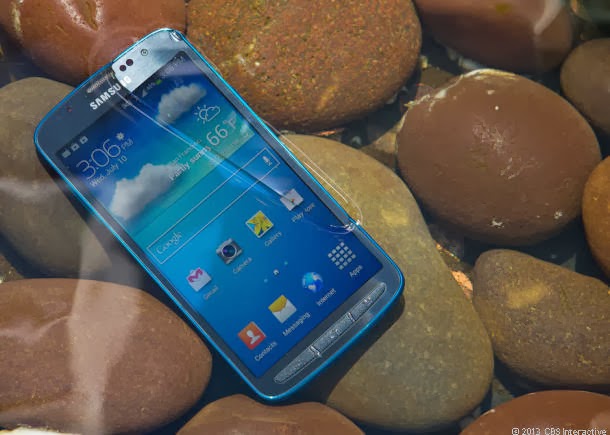
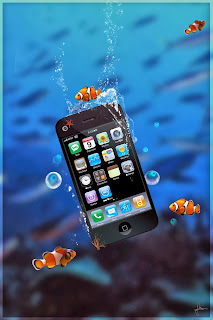
You can see in this video how to take pictures underwater with any Smartphone (iphone, Galaxy S2, S3.....) and step by step


apk-soft.net

apk-soft.net                 apk-soft.net

apk-soft.net


Vidéo


How To View Old Notifications on Android 4.3 Phones and Tablets

http://www.apk-soft.net/2013/12/How-To-View-Old-Notifications.html
By default all the notifications on an android device appears only once and by change if you clear them accidentally, then there is no way you for you to know from which app were those notification from. But this is a limitation with phones and tablets running on Android 4.2 or below versions.

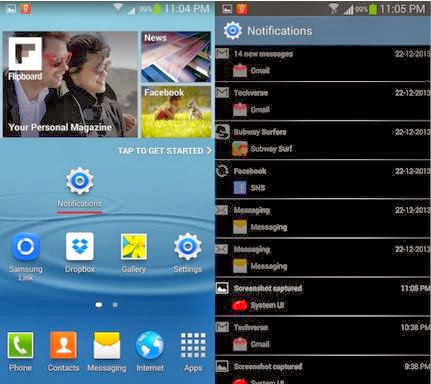
The new Android 4.3 operating system brings in a lot of new exciting features and one of them is the ability to see the notification history. So if you accidentally clear the notifications on your phone running Android 4.3 or later, you now have the ability to view all the old notifications.

There is no specific app or settings that needs to be enabled to view all the old notifications on your phone. The notification history can be viewed by enabling a widget on your Android 4.3 phone. So here is how you can view the old notifications on your Android 4.3 phone.
How To View Old Notifications on Android 4.3 Devices

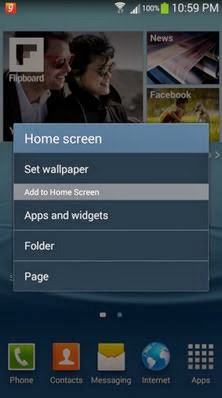
    Step 1: Tap and hold on your phone’s home screen to bring up the homescreen options and Tap on Apps and widgets.
apk-soft.net

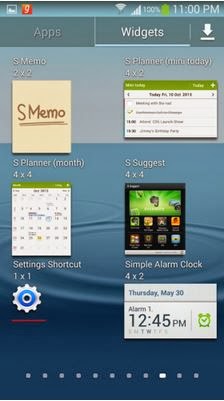
     Step 2: Browse through the widgets and Tap and hold the Settings shortcut widget and place it on your homescreen.
apk-soft.net 


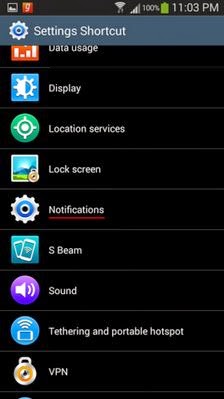
Step 3: As soon as you place the widget on your phone’s homescreen, the following menu will pop up on your phone’s screen. Tap on Notifications to enable the notification history widget.

apk-soft.net 

That’s it, now you can tap on the Notifications widget on your phone’s home screen and view all your old notifications. The notifications which are dismissed will appear as dimmed and notifications which are bright are currently active.


apk-soft.net

Keyboard Free for Android

apk-soft.net

apk-soft.net

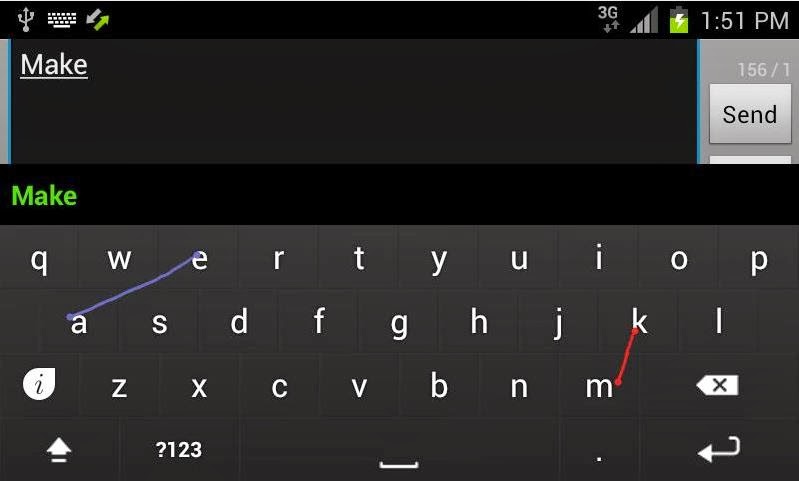
Type faster than ever before! Sweep words with both fingers twice as fast as Swype or SlideIT.
Android Police: “A very interesting take on mobile input… give it a shot”.
El androide libre: “A keyboard revolution”.
The Guardian: “Is there room for another big third-party Android keyboard besides SwiftKey and Swype?”.
Available in English, Hebrew, Spanish, Italian, French and German.

HOW TO USE
A video is worth 10,000 words so check it out to see how Keymonk works.

COMPATIBILITY
Keymonk was tested on Galaxy S2 and should work with any compliant text editor on any smartphone with good multi-touch support.

MULTITOUCH ISSUES
Some devices, including high-end devices, have defective multi-touch support. If you see the Keymonk touch indication circles flicker or change colors while sweeping with both fingers, that may be an indication that your device does not support multi-touch well.
Keep each finger at its side of the keyboard and avoid bumping them into one another since it might confuse the touch screen.

Size : 4.4M
Current Version : 2.29
Requires Android : 2.3 and up

Source

iOS 7.1 launching in March 2014 following lengthy development period

apk-soft.net

 apk-soft.net

According to BGR, Apple has seeded iOS 7.1 beta 3 to testing partners hot on the heels of the developer access to iOS 7.1 beta 2. BGR’s sources also state an expected public release of iOS 7.1 as March 2014.

   ♣♣ Apple has begun seeding a new build of iOS 7.1 to testing partners, we have learned from a trusted source. iOS 7.1 beta 3 is said to bring several important bug fixes in addition to some new features

A March launch for iOS 7.1 would mark over four months of testing as the first iOS 7.1 beta was seeded to developers in mid-November. Earlier in 2013, Apple released its iOS 6.1 update in January, though its iOS 5.1 update arrived in March 2012 so a March release is not unprecedented.

Beta 3 is said to bring important bug fixes as well as some new features, although BGR’s source was “uncomfortable” with revealing any specifics. iOS 7.1 will be the first major update to iOS 7 and is expected to bring several accessibility improvements as well as potential support for iOS in the Car support.

BGR’s track record for iOS predictions has been inconsistent in the past, so you might want to take this news with a pinch of salt for now.

I for one am excited for the release of iOS 7.1. iOS 7 was a marked change from any version of iOS before it and, in creating it in such a limited time, Apple has seemingly left many things to correct in the future.

New Year 2014 Wallpapers


Wonderful Wish Happy 
New Year 2014 Wallpapers
For your tablette, Pc and Smartphone

Click on the pictures for larger size


apk-soft.net
Click on the pictures for larger size

Apk-soft.net
Click on the pictures for larger size
Apk-soft.net
Click on the pictures for larger size
Apk-soft.net
Click on the pictures for larger size
Apk-soft.net
Click on the pictures for larger size
Apk-soft.net
Click on the pictures for larger size
Apk-soft.net
Click on the pictures for larger size
Apk-soft.net
Click on the pictures for larger size
Apk-soft.net
Click on the pictures for larger size
Apk-soft.net
Click on the pictures for larger size
Apk-soft.net
Click on the pictures for larger size
Apk-soft.net
Click on the pictures for larger size
Apk-soft.net
Click on the pictures for larger size
Apk-soft.net
Click on the pictures for larger size
Apk-soft.net
Click on the pictures for larger size
Apk-soft.net
Click on the pictures for larger size
Apk-soft.net
Click on the pictures for larger size
Apk-soft.net
Click on the pictures for larger size
Apk-soft.net
Click on the pictures for larger size
Apk-soft.net
Click on the pictures for larger size


Apk-soft.net
Click on the pictures for larger size
Apk-soft.net
Click on the pictures for larger size
Apk-soft.net
Click on the pictures for larger size
Apk-soft.net
© 2013 TeRmiNal GAMMERS - All Rights Reserved
Design by Mas Imall
Back to Top