How To Encrypt Your Android Phone’s External SD Card

www.apk-soft.net/2014/01/Encrypt-Your-SD-Card.html

Most of us have important paperwork’s and other private data that we need to keep private. As we keep transitioning from Desktops to Smartphones, our private data are now more vulnerable than before. The reason being Smartphones are portable and it makes them easy target for thieves.
We don’t want that to happen with your devices, and neither we are the ones who can control it. Also many a times we are responsible for losing our smartphones due to our irresponsibleness.

So you must be always be prepared beforehand. Nobody knows when or how your smartphones can be lost or stolen, but with Android you do have the ability to encrypt your phone’s External SD Card. Which will render your phones SD card useless once your phone is lost.This is what usually happens when your phone gets lost or stolen.

Usually we have our phone secured with a lock pattern or code. In case somebody finds your lost android phone, they might not be able to access your cell phone’s content because of the security lock, but they can take out your external SD card and access its content on a PC. This is a main reason why you need to encrypt your Phone’s external SD card if you have important or private data on it.

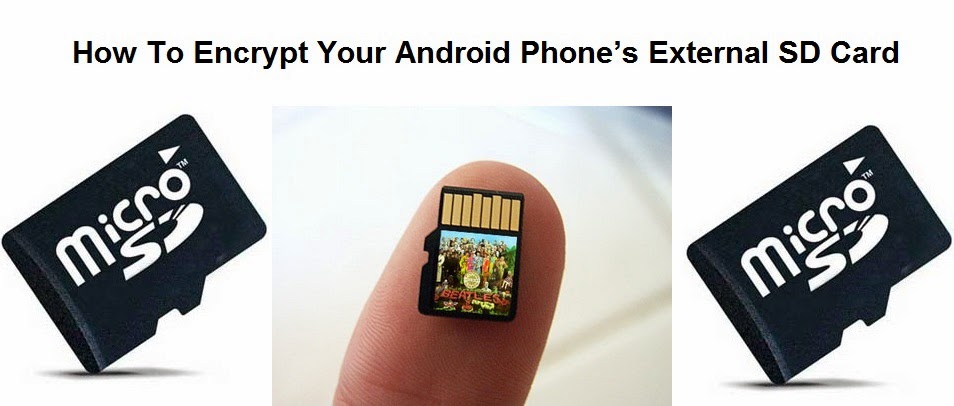
Once your phone’s External SD card is encrypted, it will then be highly impossible for anyone to read its content on any other device except your Android phone. To be frank you can even encrypt your whole Android phone, but the reason why i won’t advise for that is, Encrypting your android phone will make it slower. Here is how you can encrypt your Android phone’s External SD Card.
How To Encrypt your Android Phone’s External SD Card

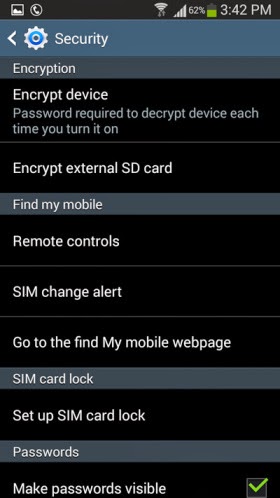
    Step 1: Open the Settings on your Android phone and navigate to the Security section. ( This might differ on different handsets )
    Step 2: Tap on Encrypt external SD card to start the process for encrypting your phone’s SD card.

www.apk-soft.net/2014/01/Encrypt-Your-SD-Card.html


Note: It is compulsory to select a password as the screen lock method if you want to enable encryption for the SD card. Unless you set the screen lock as a password, your phone will not allow you to encrypt the external SD card.

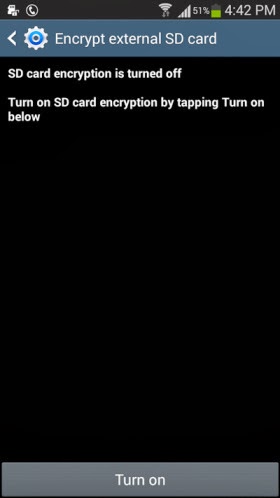
    Step 3: Once you have set a 6 digit password as the screen lock, you can then see the following option appear. Tap on Turn on card to encrypt your phone’s external SD card

www.apk-soft.net/2014/01/Encrypt-Your-SD-Card.html

    Step 4: Tap on Yes on the next screen to encrypt all files on your phone’s external SD card.

www.apk-soft.net/2014/01/Encrypt-Your-SD-Card.html

    Step 5: Next you will be prompted whether you want to encrypt all multimedia files. Tap on Yes or No according to your requirement. in case there are any multimedia files that needs to be encrypted on your phone’s SD card the tap on Yes.

www.apk-soft.net/2014/01/Encrypt-Your-SD-Card.html

www.apk-soft.net/2014/01/Encrypt-Your-SD-Card.html

    Step 6:
Next tap on Continue and enter the password when prompted.

www.apk-soft.net/2014/01/Encrypt-Your-SD-Card.html

www.apk-soft.net/2014/01/Encrypt-Your-SD-Card.html

    Step 7: Finally you will need to tap on Apply to start the encryption process. Remember according to the SD card’s size, it might take a while for the encryption process to be completed. I tested this feature on a 4GB SD card which took around 20 minutes to encrypt.

www.apk-soft.net/2014/01/Encrypt-Your-SD-Card.html

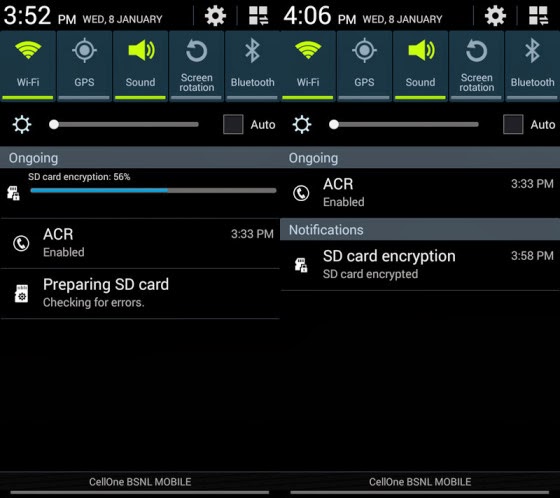
You can expand the notification bar to see the progress of the encryption process. Once the SD card is encrypted you will see the following notification.

www.apk-soft.net/2014/01/Encrypt-Your-SD-Card.html 

That’s it and now the content on your SD card are completely protected. For any reasons if you want to decrypt the contents of the SD card then you can navigate to the Encryption settings on your android phone and tap on Turn off to decrypt the external SD card.

Samsung Smart Home platform to debut at CES 2014

Samsung Smart Home platform to debut at CES 2014

Getting in some early news, Samsung has – as part of CES 2014 – The Samsung Smart Home platform will enable users to manage all of their connected appliances and devices through a single application., a means by which users will be able to control all their connected home appliances (from refrigerators to air conditioners to smart light bulbs) through a single app on their compatible smartphone, tablet, smart TV, or wearable device.

According to Samsung, the company is also extending the Samsung Smart Home platform to third-party manufacturers in order to make the platform more widely usable by consumers.

When travelling abroad or even just when you’re not at home, you can use your smartphone or tablet to monitor your smart devices and controlling their functions, such as turning on the lights remotely.

Samsung will also introduce voice commands that can be used to control several appliances at once. For example, you could say ‘going out’ to your Samsung Galaxy Gear for your TV, lights and other select appliances to be switched off. Or you could say ‘good night’ to your TV remote for the TV to switch off and your lights to slowly dim until they are completely off.

www.apk-soft.net/2014/01/Samsung-Smart-Home-2014.html

To start, the service will cover three main areas, which Samsung identifies as :

      Device Control.
    Home View.
    Smart Customer Service.


Device Control, as you might guess, allows users to control home devices using a mobile device remotely. The feature also allows for voice commands so if, for example, you’re going to bed, you could tell your smart TV “good night,” and it would know to turn off and tell the lights to dim gradually.

Home View will give users a peek inside their own home with “in-built appliance cameras.”

Smart Customer Service will notify you “when it’s time to service appliances or replace consumables.”

What is perhaps more interesting than Samsung’s initial offering – which will roll out across Samsung’s own devices and appliances “in the first half of 2014″ – is that the manufacturer has developed a “Smart Home software protocol” that will allow other device and appliance manufacturers to gain compatibility with the system.

Samsung also notes in its release that it plans to expand the service to home-energy, secure home access, healthcare, and “eco home applications” through unspecified third-party partners. For the full announcement, hit the link below.

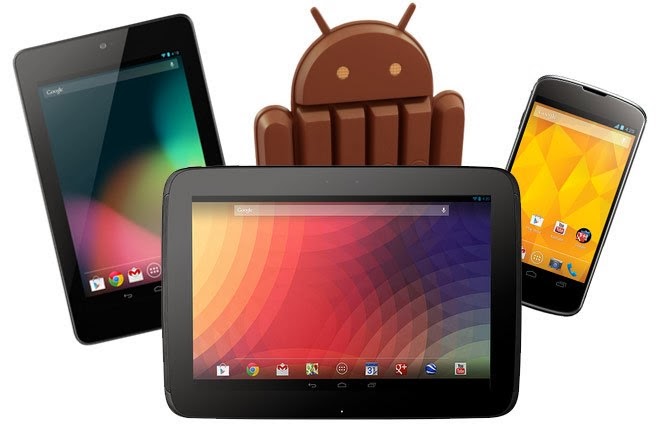
Install Official Android 4.4 KitKat on Nexus 4, Nexus 7 and Nexus 10

As the Google promised that Android 4.4 KitKat will be released soon for the all Nexus devices; so, finally, the latest Android 4.4 KitKat is released by Google through the OTA. While, many of the users seem to have received the latest update via OTA, and some are still waiting because it totally depends on the region so it might take some more before it reaches you. However, the Google has already uploaded the Android 4.4 KitKat Factory images for all the devices and definitely, one can update their Android version using that image.


install-Android-4.4.html


If you are the one who haven’t received the newest Android 4.4 KitKat update on your Nexus device then you can follow the below stepwise guide to update it manually and start using it before anyone else. Today, in this post will show you the step-by-step guide on how to install Official Android 4.4 KitKat on Nexus 4, Nexus 7 and Nexus 10. Your task is to follow the below tutorial intensively without missing any of the steps, otherwise your device may be bricked. To stay safe side, it’s advisable to take a complete backup of your current ROM. Let’s begin the tutorial.
Note: As this is the official update, so you don’t have to root your Nexus device.

Things To BE Checked:

    Charge your Nexus device up to 70-80%.
    Make sure you have enabled the USB debugging.
    Your device bootloader must be unlocked.

Download Drivers and ROM files:

    Android SDK - Install it on your PC.
    Android 4.4 KitKat Update - Extract it on your Computer’s desktop.


Steps To Install Official Android 4.4 KitKat on Nexus 4, Nexus 7 and Nexus 10

Step 1: If you have recently enabled the “USB Debugging” option then you have to check box stating “RSA Key” from your Nexus device. Otherwise, your device will not be detected in fastboot mode.

Step 2:
Go to the below path, which states the installation of “Android SDK” on your computer.

    C:Program Files\Android SDK\sdk\platform-tools

Step 3: For ease, you have to copy the files from extracted folder of your Android 4.4 Update file to the above path.

Note: Copy the files, not the folder.

Step 4: From there only, you have to open the command prompt. To do so:

    Press and hold “Shift Key” and press “Mouse Right-Click”. A sub-menu will appear.
    Now, choose the option “Open command window here“.

Step 5: In the command prompt window, you have to write following command to boot your device in to Bootloader mode.

    adb reboot bootloader

Step 6: Once you get in to bootloader mode, please close the command window.

Step 7: Now, double-click on “flash-all.bat” file to start the Android 4.4 KitKat update process.

Step 8: Further, you have to just wait and watch the process, but don’t do anything. Otherwise, your device will be bricked.

Step 9: Once the process is completed, your device will be rebooted automatically.

That’s it! This time your device will boot-up with the new Nexus logo, this means you have successfully installed the official Android 4.4 KitKat on Nexus device.

In case, if you need any help then you can connect with us using the comments box below.

What to expect form CES 2014

What to expect form CES 2014
apk-soft.net

When one thinks of Las Vegas, mobile gadgets are far from the first thing that comes to their mind. They’re probably not even in the top five list. But as any devoted geek should know, for the past 15 years, Sin City has been the host for one of the world’s largest technology trade shows – the Consumer Electronics Show, or CES for short.


During the event, which is set to begin on January 7, 2014, both major and not-so-major electronics manufacturers will get together under one roof to showcase their latest products and innovations. And to no surprise, many new smartphones and tablets get announced each year at CES, which is why we’ve always followed the show with a great dose of interest.
Now, while CES is an event that gets a lot of attention from the media, prior to its launch, there’s usually very little information as to what exactly is going to be unveiled. However, there’s plenty of leaks for us to analyse and use to make our predictions. In fact, the rumor mill has presented enough information for us to compile a list of smartphones, tablets, and other smart products that we will likely see at CES 2014.

1. Samsung

apk-soft.net

While we aren’t really sure what Samsung is going to announce at its CES 2014 event, we think we know what’s not going to be announced. It is unlikely to see the company’s newest tablets(Note pro) as those are said to be coming in February, and there’s a near-zero chance of seeing the Samsung Galaxy S5 on stage. On the other hand, we might get to see a new Samsung Galaxy Camera model and a new Windows Phone 8 smartphone, if recent rumors are to be trusted. Also, we won’t be surprised if the company updates us on the state of its Exynos system-on-chip solutions.


2. LG


apk-soft.net

 
The rumor mill is building up hype around an “LG G3” smartphone, yet we aren’t expecting to see the G2′s successor at CES 2014. On the other hand, LG might announce the rumored LG G2 mini – a mid-range cousin of the LG G2. Another exciting device that LG is said to be working on is its very own smartwatch. Dubbed “G Arch“, it could be announced alongside a heath-tracking wristband referred to as “G Health“. What’s more, LG could be working on its own mobile SoC, and CES could be the right time for it to be introduced to the world.

3. Sony
apk-soft.net

With all those Sony smartphones leaking from here and there, it goes without saying that CES could see the announcement of at least some of them. These may include a 6-inch phablet with an octa-core SoC and the entry-level Sony Xperia E2. But the star of the show should be the Sony Xperia Z1s, or whatever it ends up being called. This is said to be a smaller, yet no less capable variant of the Xperia Z1. Last but not least, Sony’s third smartwatch could be announced as well.

4. NVIDIA

apk-soft.net

Yup, NVIDIA has its own CES 2014 event as well. This leads us to believe that a next-gen Tegra SoC could be in the works, and we might get to learn more about it at the show. If a Tegra 5 is indeed bound to be announced at CES, then NVIDIA could also introduce us to some of the upcoming devices the chip would be powering – a new Tegra Note tablet, or why not a successor to the NVIDIA Shield console? That is more of a guess, however, so don’t get too excited ahead of time.

5. Asus
apk-soft.net

We know that Asus is developing a new tablet, on which Android and Windows can happily coexist, and CES could be when we’ll get to give it a try. And if that’s not cool enough, Asus could also announce a new Padforne model at its CES 2014 event. Dubbed Asus Padfone X, the Android 4.4-powered device will brag with its top-notch hardware specs.

6. Lenovo
apk-soft.net
The newest products in Lenovo’s portfolio are to be showcased at CES 2014 – we’re expected to see new smartphones, tablets, and everything in between. Chances are that both Android- and Windows-based hardware (Dual boot) will be presented by the company.

7. Acer

apk-soft.net

Acer is also going to be present at CES 2014. However, the company is not giving us any hints as to what products we should be expecting to see from it. New smartphones, new tablets, new laptops, or all of the above? We can only guess

Samsung Galaxy S5 concept

Samsung Galaxy S5 concept
apk-soft.net

A new concept video for the Samsung Galaxy S5 shows what Samsung’s next phone could be like if it takes a couple features from the iPhone 5s and iterates on them.

The major focus of the new concept video is what the video creators Rozetked call Reach ID. The idea of Reach ID is very similar to Apple’s Touch ID on the iPhone 5s, but a bit more useful. Where Touch ID is only accessible from the iPhone’s home button, the concept Reach ID unlocks the phone with a fingerprint from anywhere.

Video


With the Reach ID concept you would simply put your finger anywhere on the home button or homescreen of the Galaxy S5 to unlock the phone. Or, if you can’t reach your phone for some reason, Reach ID can unlock the S5 with just your voice. Presumably such a feature use a specific passphrase or cadence like Touchless Control feature of the Moto X, but because this is a concept video it’s not limited to such restrictions.

Speaking of not limited to reality, this concept video shows some neat voice control features that let you create a workflow for your phone. The voice control features in the concept video can open the music app, play songs from Metallica, then open the most recent photos in the Gallery app with just a few sentences and no taps required. Even more than Reach ID the feature seems like a ways off, and, if it did exist, it probably wouldn’t use the Google Now UI, but it’s always nice to dream.

Of course, the video ends with specs of the concept Samsung Galaxy S5 that make sense with the most recent rumored specs for the phone.

apk-soft.net

Specs:
Display :  5.2-inch 2K (2560×1440 resolution)
Processor : 64-bit Exynos 5 Octa processor
Operating System : Android 4.4 KitKat
RAM : 3GB

The Samsung Galaxy S5 is still a few months away, so expect a few more concept videos like this one and a few more rumors before it actually comes out. We don’t know much about the next Samsung flagship, but if it’s anything like this concept video, it should be a very exciting phone. If Samsung is following in the natural progression of what it had done for the past several major device launches, then it’s likely to have the best in class specifications; many of which have been listed above.

Top Tablets The best tablets available to buy today

apk-soft.net

Top Tablets 2013-The best tablets available to buy today

The tablet market is still growing fast and it’s being driven by Android. According to IDC shipments were up 36.7% last quarter compared to the same period last year. We are starting to see a much wider range of Android tablets, and the overall experience for Android tablet owners is improving fast, thanks to developments like the Play Store highlighting tablet optimized apps.

We can divided the tablet line up neatly into two sections: big and small.

Best small Android tablet

We’ll start with the small tablets, ideal for people seeking a portable solution when they’re out and about.

1. XOLO Play Tegra Note Tab


apk-soft.net 

In the Tegra Note Tab’s case it is the Nvidia Tegra 4 chipset that includes a quad-core processor clocked at 1.8GHz and a GeForce GPU. The hardware promises excellent performance and it does deliver on that promise. But I’ll get to that in a bit. Other noteworthy hardware features include a 7-inch IPS display with a resolution of 1280×800 pixels, 1GB of RAM, 16GB internal storage (along with support for microSD cards up to 32GB), stereo speakers, a 5MP rear camera and a VGA front-facing one.

The Xolo Play Tegra Note Tab comes with Android 4.2.2 Jelly Bean and XOLO has promised that it will be prompt with OTA OS updates.Perfomance wise the XOLO Play Tegra Note score very good in front of other tablet in this price range.

Battery life is very good and the tablet lasted for ten hours in our continuous video playback test where we ran a 720p video with the brightness set to max and the Wi-Fi on. This would translate to about 15-20 hours of normal use which includes a little gaming, browsing and running apps. Since the Tegra Note is supposed to be a gaming tablet, it’s only appropriate (and quite impressive) that it will give you about 4 hours of continuous gaming on a single charge.

Price : 17999 INR (WiFi)

2. Nexus 7 (2013)


apk-soft.net 

When Google partnered with Asus to create the original Nexus 7 it was a smash hit. Consumers and critics alike loved the tablet, and it offered unbeatable value for money. It was perhaps inevitable that a sequel would follow and sure enough we got one in the summer. Google stuck with Asus to produce another understated, but solid design that’s slimmer and lighter than its predecessor, with several important improvements.

The first thing that strikes you about the Nexus 7 is that stunning 1920 x 1200 pixel display. With 323 pixels per inch, books and movies look fantastic on it. Throw genuine stereo speakers into the mix and it’s the ideal portable package for content consumption. Inside, the 1.5 GHz quad-core Snapdragon S4 Pro processor, with 2GB of RAM, proves itself capable of running the latest games. Stock Android is super slick, Jelly Bean brought another raft of subtle improvements, and the Nexus 7 was quick to get KitKat, as it will be to get future updates.

Google had to increase the price slightly, to 21000 INR for the 16GB version, but this is still the best value small tablet on the market.

Price : 21,000 INR

3. LG G Pad 8.3


apk-soft.net 

LG decided that 7 inches wasn’t enough and so its best small Android tablet offering is the G Pad, which has an 8.3-inch display with a resolution of 1920 x 1200 pixels. That’s the same resolution as the Nexus 7, but because the screen is bigger the ppi is 273. The specs are very good with a 1.7GHz quad-core processor, 2GB of RAM, and 16GB of internal storage backed up by a microSD card slot.

The G Pad has a pretty premium feel and you’ll find LG’s suite of features, from QSlide apps to Slide Aside, are actually quite useful, even if the interface doesn’t look great. The downside here is the much higher price tag (30000 INR) and the average battery life. Even with a 4600mAh battery, this tablet will need charged every night, and it dies fast if you watch movies or play games.

We think this is an underrated option and if you want something a little bigger than 7 inches it’s a good choice.

Price : 30,000 INR
The Bottomline
The XOLO Play Tegra Note tablet is available from today for Rs. 17,999, which frankly is a killer price for a tablet that does so many things well. At this price, the only real competition the Tegra Note gets is from the Nexus 7 (2013) that’s now being sold in India directly by Google for Rs. 20,999 (16GB). If the display and overall design and feel is paramount, then we’d recommend the new Nexus 7. However, where the XOLO tab scores is its performance, some neat additional features (such as the stylus and the Tegra Zone access) and the ability to accept microSD cards. Which of the two sound more attractive is a decision I will leave to you. Just know that buying either of the two will be a great decision.
Best big Android tablet


If you want to kick back on the couch, or surf the web in bed, then you want a nice big tablet to do it on. These are our top picks in the 10-inch space for 2013.

1. Apple iPad Air


apk-soft.net 

The iPad Air is sort of the iPad 5. And this latest tablet walks all over the iPad 4 – it’s lighter and thinner, but retains the same 9.7-inch screen panel. It’s also faster than before, to the point it’s future-proof for the time being and won’t feel out of date in six months.

For die-hard Apple fans we can see how you would be disappointed in terms of wow factor, as there is no standout feature here – the Air feels like an iPad mini Retina upscaled. And it lacks the Slow-Mo movie and Touch ID fingerprint scanner of the iPhone 5S.

That’s not to say the iPad Air is lacking. It’s not. It is seamless experience that just works. If anything the Air is a problem for Apple – and this is a good thing for us all – because by creating something so desirable, fast and functional, we suspect you won’t need or want to upgrade for a long, long time. Even iPad 4 owners will likely want one, especially if you’re fed up of resting the weightier, larger slab on your leg all the time.

Apple has created a tablet experience that surpasses all others. It’s the best tablet on the market in terms of performance, apps, and desirability.checkout our full review. What more can we say than that?…..

Price : (starting @) 35,900 INR

2. Nexus 10

apk-soft.net
It really says something about the larger tablet category on Android that a device released in 2012 is still the best big Android tablet in 2013. The Samsung manufactured Nexus 10 wowed everyone with its 2560 x 1600 pixel resolution, providing an amazing 300ppi on a 10-inch display. Google understands that people primarily want tablets for content consumption and so, despite fighting to keep costs down, it never scrimps on the display.

The rest of the hardware is aging. We all expected an update before the end of the year, but it looks like the Nexus 10 refresh won’t land until 2014. As a stock Android device the Nexus 10 has already got the KitKat update and that 1.7 GHz dual-core A15 processor still performs really well. It’s also backed by 2GB of RAM, so it can handle multitasking. The lack of a microSD card slot is a downside, but the Nexus 10 is almost as good value as its smaller brother.

At  this tablet is still a pretty attractive proposition, but with a refresh around the corner, patience is a virtue.

Price : 32,900 INR

3. Sony Xperia Tablet Z

apk-soft.net 

If Sony had done a refresh, like it did with the Z1 then this tablet could have claimed the top spot, but there are a couple of weaknesses that we can’t overlook. The 1.5GHz Snapdragon S4 Pro is dated, even if it is backed by the Adreno 320 GPU and 2GB of RAM. The display is also 1920 x 1200 pixels with a 224 ppi. It still looks great, and Sony’s Bravia technology is not to be sniffed at, but it’s not at the same level as the Nexus 10.

In terms of build quality the Xperia Tablet Z is a real winner. It looks and feels beautiful, it’s impossibly svelte, and you can take it into the shower or bath with you, so you never need to be parted. Seriously, the waterproof feature is more than just a gimmick and it’s awesome to be able to watch a movie in the bath without fear. The battery life is also excellent and there’s a microSD card slot for expanding that storage.

Sony also has a nice UI and some decent apps, and the tablet works well as a universal remote, thanks to an IR blaster.

Price : 42,900 INR.
Google and Audi plot new front in Android vs. iOS war

apk-soft.net

Google and Audi plot new front in Android vs. iOS war

After starting out in the world of smartphones, Google’s Android has since grown its presence in the world of technology by appearing on tablets, televisions, eyewear and more. Now it looks like we may know the market that the Bugdroid has its sights set on next: The world of automobiles.

A new report from The Wall Street Journal claims that Google and Audi are planning to take to the CES stage next month to announce their plans to create an Android-powered in-car entertainment system. Sources claim that Google and Audi will team up with other automotive and technology companies on the effort, including NVIDIA.

The announcement that Google is working directly with a car manufacturer comes seven months after Apple announced iOS in the Car. Where Apple’s platform integrates the iPhone into the car’s infotainment system to provide access to maps, messages, and other apps, Google and Audi’s joint efforts will see Android and Android-based apps run on the car’s own hardware.

GOOGLE’S ANNOUNCEMENT WILL COME SEVEN MONTHS AFTER APPLE ANNOUNCED IOS IN THE CAR


Eventually the project could allow drivers and passengers to access apps, music, navigation and other services that are similar to what’s already found on Android smartphones. This software would reportedly run on hardware built directly into the vehicle rather than rely on an Android-powered smartphone for the heavy lifting.
apk-soft.net

Some Audi drivers can already access Google products through their car: the German manufacturer started rolling out Tegra-powered entertainment and information systems in its vehicles in the same year that it demonstrated cars that could navigate through parking lots without a driver behind the wheel.
 ANDROID WILL RUN ON THE CAR’S OWN HARDWARE

Many of the details of Google and Audi’s work are still a mystery for now, but it makes sense that The Big G would look to vehicles as a way to help Android grow. Not only is it still a fairly wide open market, but Google can use its existing Android app base to ensure that its in-car system has a large selection of software for consumers at launch. Plus, as more people adopt smartphones and integrate them into their daily lives, they’ll want to be connected as much as possible and could see a familiar-looking Android entertainment system as a good reason to buy one vehicle over a different one that’s not similarly-equipped.

The Wall Street Journal says that Google and Audi will outline a timetable to offer Android-based systems in new models due to arrive over the next four or five years. Details of the collaboratively created systems aren’t yet known, but Google’s direct influence and quick response to its biggest competitor’s move into the automotive field ensure that the car will be the newest battleground for Android and iOS.

What do you think of the possibility of an Android-powered in-car entertainment system? Would such a setup influence your decision on whether or not to purchase a particular vehicle?

Welcom to th first Nokia phone Android

apk-soft.net

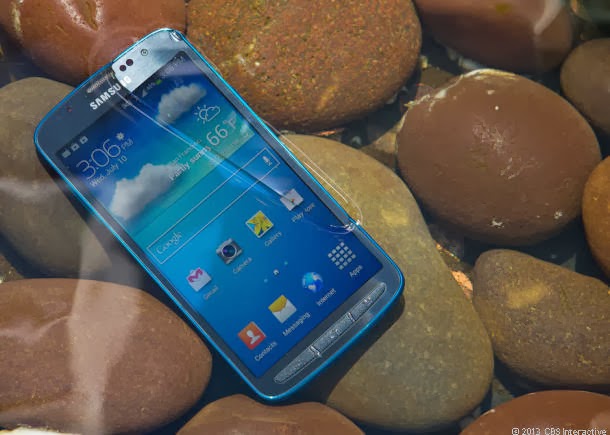
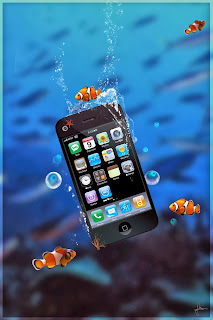
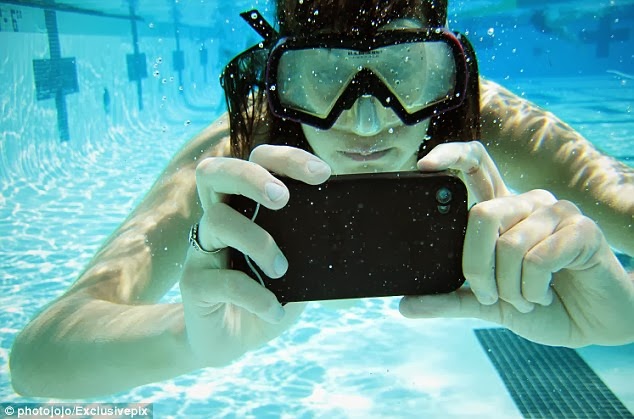
How to take pictures underwater with any Smartphone

apk-soft.net

You can see in this video how to take pictures underwater with any Smartphone (iphone, Galaxy S2, S3.....) and step by step


apk-soft.net

apk-soft.net                 apk-soft.net

apk-soft.net


Vidéo


the best 16 Android Apps, themes-widgets

On the occasion of the arrival of the New Year 2014 and Letting for the year 2013, decided our site Www.Apk-Soft.neT providing the proceeds of the best 16 Android Apps, themes-widgets and the most downloaded and at a rate of 1000 +


apk-soft.net


apk-soft.net 
Camera ZOOM FX v5 is HERE!!! introducing 'Best Photo Mode'!!
OVER 20 NEW FEATURES in one huge update - see recent changes for full list!!


Having a hard time finding that one movie in Gallery


With MyScript Calculator ( Calculator ) perform mathematical operations using your writing.


This application lets you can remote control the camera inside Smart Phone.


Android ROOT is a software, programed by years of dedicate development, which can help Android users to root their devices in the easiest and safest manner. It is free of any charges, risks and preparations.


THE MOST DOWNLOADED OFFLINE NAVIGATION APP IN THE WORLD!

"The best quality-price ratio"


Root Explorer is the ultimate file manager for root users. Access the whole of android's file system (including the elusive data folder!).


the best apps to download video's youtube and with multiple quality


you can add, create and customize any number of remotes, combining controls from any of your existing remotes. Imagine a single remote on which the CHANNEL UP button controls your Set Top Box from your TV provider, the VOLUME control your home theater system and the arrow control your TV's menu.


 AVG Mobilation Antivirus Pro is a mobile security solution that not only helps protect your phone from viruses, malware, spyware & online exploitation in real-time, but also offers a suite of features to help keep your privacy, personal data and online identity safe.


Protect your Android™ phone and tablet with the top-rated (4.6 stars!) free mobile security app with both antivirus and anti-theft.
 Avast! Mobile Security keeps your device safe from viruses, malware, and spyware


Lone hiPPo is proud to present a brand new LWP that combines the Parallax Depth effect found in iOS7, with Google's latest KitKat 4.4 for Nexus 5 Wallpaper. This awesome combination brings floating objects to life as you tilt your device


Officially designed for #1 ranked Next Launcher 3D in Google Play Store. Get it now and redefine your Android device with splendid operation experience and visual 3D effects!


 Fall Theme Go launcher ex v1.1  market

android.com.launcherex.theme Theme Style: colored, classic, season, fall, nature, wood, wooden.

Theme Name: Fall


Season Zen includes Spring, Summer, Autumn / Fall, and Winter themes - four wallpaper themes for the price of one! Celebrate


apk-soft.net


 On HONEYCOMB or ICECREAMSANDWICH a reboot MIGHT be needed to make the widget show up on the list, click actions (for alarm or apps) are pro only. If you are upgrading from GINGERBREAD to ICS please reinstall the widget
.


© 2013 TeRmiNal GAMMERS - All Rights Reserved
Design by Mas Imall
Back to Top