Most of us have important paperwork’s and other private data that we need to keep private. As we keep transitioning from Desktops to Smartphones, our private data are now more vulnerable than before. The reason being Smartphones are portable and it makes them easy target for thieves.
We don’t want that to happen with your devices, and neither we are the ones who can control it. Also many a times we are responsible for losing our smartphones due to our irresponsibleness.
So you must be always be prepared beforehand. Nobody knows when or how your smartphones can be lost or stolen, but with Android you do have the ability to encrypt your phone’s External SD Card. Which will render your phones SD card useless once your phone is lost.This is what usually happens when your phone gets lost or stolen.
Usually we have our phone secured with a lock pattern or code. In case somebody finds your lost android phone, they might not be able to access your cell phone’s content because of the security lock, but they can take out your external SD card and access its content on a PC. This is a main reason why you need to encrypt your Phone’s external SD card if you have important or private data on it.
Once your phone’s External SD card is encrypted, it will then be highly impossible for anyone to read its content on any other device except your Android phone. To be frank you can even encrypt your whole Android phone, but the reason why i won’t advise for that is, Encrypting your android phone will make it slower. Here is how you can encrypt your Android phone’s External SD Card.
How To Encrypt your Android Phone’s External SD Card
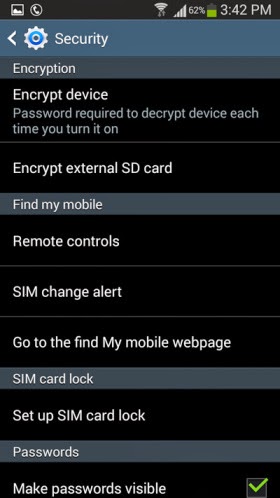
Step 1: Open the Settings on your Android phone and navigate to the Security section. ( This might differ on different handsets )
Step 2: Tap on Encrypt external SD card to start the process for encrypting your phone’s SD card.
Note: It is compulsory to select a password as the screen lock method if you want to enable encryption for the SD card. Unless you set the screen lock as a password, your phone will not allow you to encrypt the external SD card.
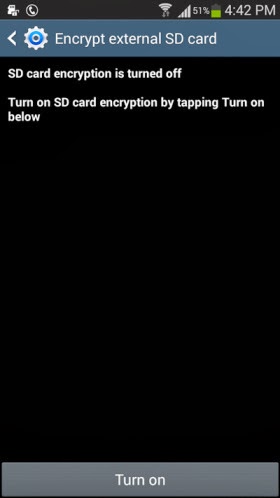
Step 3: Once you have set a 6 digit password as the screen lock, you can then see the following option appear. Tap on
Turn on card to encrypt your phone’s external SD card
Step 4: Tap on
Yes on the next screen to encrypt all files on your phone’s external SD card.
Step 5: Next you will be prompted whether you want to encrypt all multimedia files. Tap on Yes or No according to your requirement. in case there are any multimedia files that needs to be encrypted on your phone’s SD card the tap on Yes.
Step 6: Next tap on
Continue and enter the password when prompted.
Step 7: Finally you will need to tap on
Apply to start the encryption process. Remember according to the SD card’s size, it might take a while for the encryption process to be completed. I tested this feature on a 4GB SD card which took around 20 minutes to encrypt.
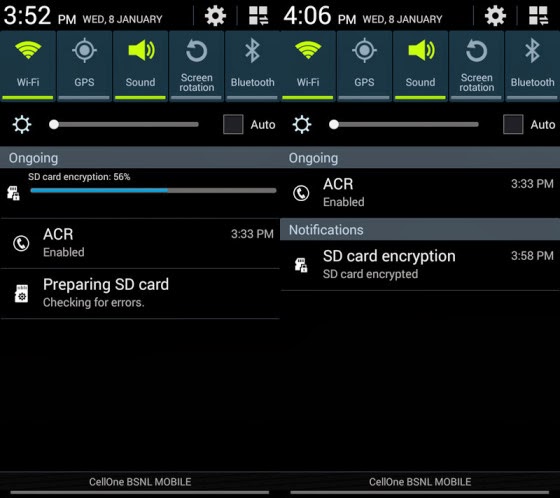
You can expand the notification bar to see the progress of the encryption process. Once the SD card is encrypted you will see the following notification.
That’s it and now the content on your SD card are completely protected. For any reasons if you want to decrypt the contents of the SD card then you can navigate to the Encryption settings on your android phone and tap on Turn off to decrypt the external SD card.






+1.jpg)


